|
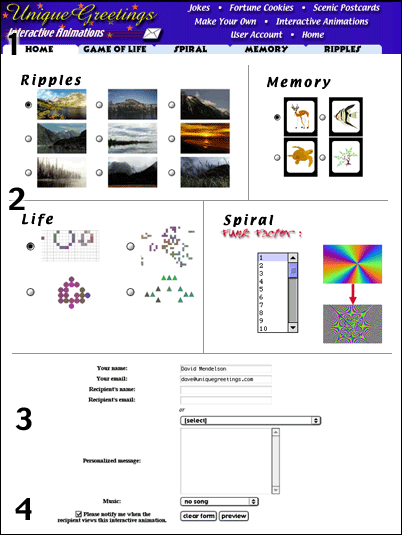
1. Select the category of animation you would like to send by clicking on one of the tabs.
2. Next you select the images or apperence of the animation. In ripples, you
choose the picture you would like to have water ripples below. The memory selection is
for the pictures that your recipient will have to match. The choice for life lets you select
the shape of the creatures. Last, but certainly not least, the funk factor selection for the
spiral lets you choose how weird the spinning colors look.
3. Fill in your name and email address and your recipient name and email address.
If you are a registered UniqueGreetings member you will also be able to choose recipients
from your personal address book (seen here as the menu entitled "[select]").
4. Select if you would like to know when your recipient picks up their
personalized greeting and then fill in your personal message. Finally, click the
preview button to preview and send your virtual greeting!
|